MacPaw Launches Moonlock iPhone App for Scam Detection and Security Audits
MacPaw has released Moonlock for iPhone, expanding its cybersecurity suite to iOS. The app focuses on identifying phishing attempts via Scam Detect, filtering scam SMS, and auditing device security settings. Unlike the Mac version, it cannot scan for malware due to iOS restrictions. The launch aims to help users protect personal data and improve their iPhone's security posture against online threats.
Key points
- MacPaw, a software developer known for CleanMyMac, has launched Moonlock for iPhone, marking its first entry into the iOS cybersecurity market.
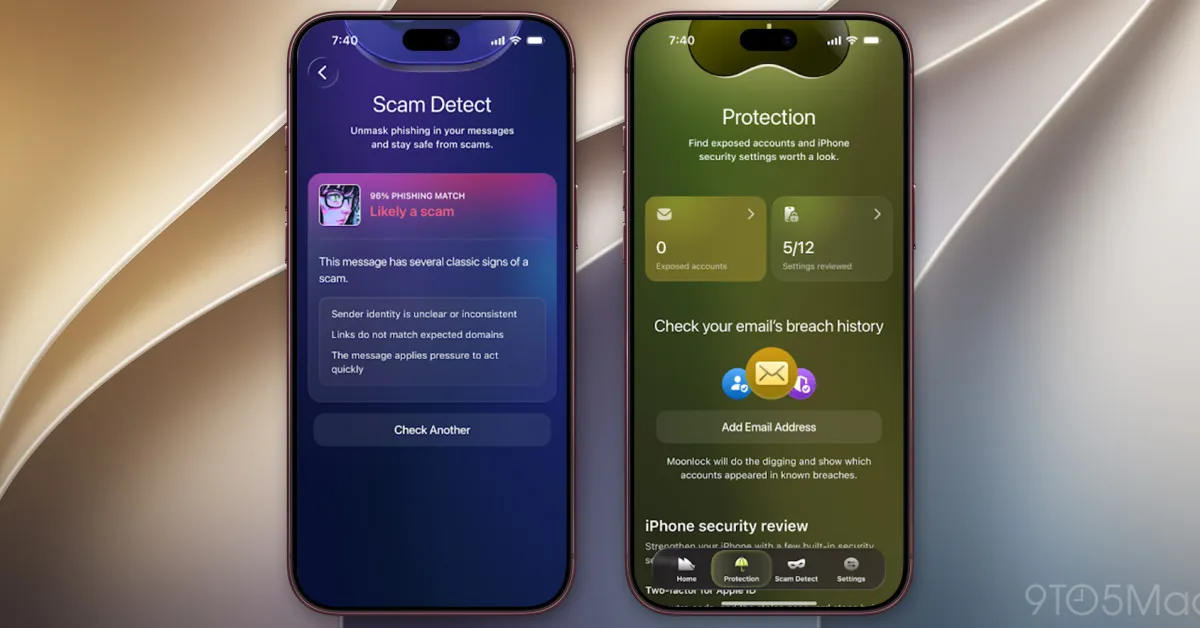
- The app features Scam Detect, which analyzes pasted text, screenshots, links, and QR codes for phishing signs, and Safe SMS, an opt-in filter for scam messages.
- Moonlock provides a Security Score from 0 to 100 based on iPhone settings and includes Email Breach History to check for exposed data in known leaks.
- Unlike the Mac version, the iOS app cannot scan for malware or access other apps' files due to Apple's strict sandboxing restrictions on third-party software.
- The release complements existing Mac tools by focusing on user education and proactive threat recognition rather than automated system-level protection.
MacPaw has officially launched Moonlock for iPhone, extending its cybersecurity portfolio beyond macOS to the mobile platform. The company, best known for its system optimization and security tools for Mac, introduced the app on Wednesday, November 18, 2026. This release marks the first time the firm has offered consumer-focused security features specifically designed for iOS devices. The application is positioned as a complementary tool to Apple’s built-in security mechanisms, aiming to help users identify and avoid online threats such as phishing scams and social engineering attacks.
The core functionality of Moonlock on iPhone centers on threat detection and user education. A primary feature is Scam Detect, which allows users to paste suspicious text, share screenshots, or scan QR codes directly within the app. The software then analyzes the content for indicators of phishing or malicious intent, providing an assessment that explains why the item may be suspicious. This manual scanning capability is designed to empower users to verify the legitimacy of communications before they interact with them. Additionally, the app includes a Safe SMS feature, which is opt-in and automatically filters out scam text messages. Users can review a record of intercepted messages and the reasons they were flagged.
Beyond active threat detection, Moonlock offers diagnostic tools to help users understand their device's security posture. The app generates a Security Score ranging from 0 to 100, reflecting the current state of the iPhone’s security configuration. Based on this score, the app provides specific recommendations for improvement, such as enabling passcode protection, updating iOS, or securing Wi-Fi connections. It also includes an Email Breach History feature, allowing users to check if their email addresses have appeared in known data breaches. If a breach is detected, the app reveals the source, date, and type of exposed information, guiding users through steps to secure affected accounts.
A significant distinction between the iPhone and Mac versions of Moonlock lies in their technical capabilities. The Mac version, released last year, includes real-time protection against malware, the ability to manually scan for threats in system folders, and a VPN for encrypting internet traffic. It also features a network inspector that monitors app data connections. In contrast, the iOS version cannot scan for malware or access other apps’ files. This limitation is due to Apple’s strict sandboxing policies, which prevent third-party applications from inspecting the contents of other apps or the broader file system. Consequently, the iPhone app focuses exclusively on scam detection, data breach checks, and security setting audits rather than automated malware removal.
The launch of Moonlock for iPhone reflects a growing consumer demand for tools that enhance digital literacy and personal data protection. As phishing attacks and social engineering scams become more sophisticated, users are increasingly seeking ways to verify the authenticity of messages and links. MacPaw’s approach emphasizes user agency, providing tools that require active participation rather than operating invisibly in the background. The company states that the app is designed to help people recognize potential scams, understand their iPhone’s security, and take practical steps to improve it.
Industry observers note that the separation of features between the Mac and iOS versions highlights the technical constraints of the Apple ecosystem. While Mac users benefit from comprehensive, system-level security tools, iOS users rely more on app-based solutions that operate within defined boundaries. This distinction may influence how developers design security applications for Apple platforms in the future, balancing user protection needs with platform restrictions.
MacPaw continues to expand its footprint in the cybersecurity market with this release. The company has not yet announced pricing details or subscription models for the iPhone app, nor has it specified if it will be available as a standalone purchase or part of a bundle with its Mac products. Users interested in the app can download it from the Apple App Store. The launch underscores the competitive landscape of mobile security, where third-party developers must navigate Apple’s ecosystem rules while providing value-added protection against evolving online threats.
Key takeaways
- MacPaw released Moonlock for iPhone on November 18, 2026, expanding its cybersecurity tools to iOS.
- The app features Scam Detect for analyzing messages and QR codes, and Safe SMS for filtering scam texts.
- iOS restrictions prevent malware scanning, so the app focuses on threat detection and security audits.
- Users can check their Security Score and verify email addresses against known data breaches.
- The launch highlights the difference between Mac-level system protection and iOS app-based security features.
Sources
The WireByte editorial team synthesises technology news from multiple primary sources, verifies the facts, and links every source. Articles are produced with AI assistance and reviewed under our editorial policy.