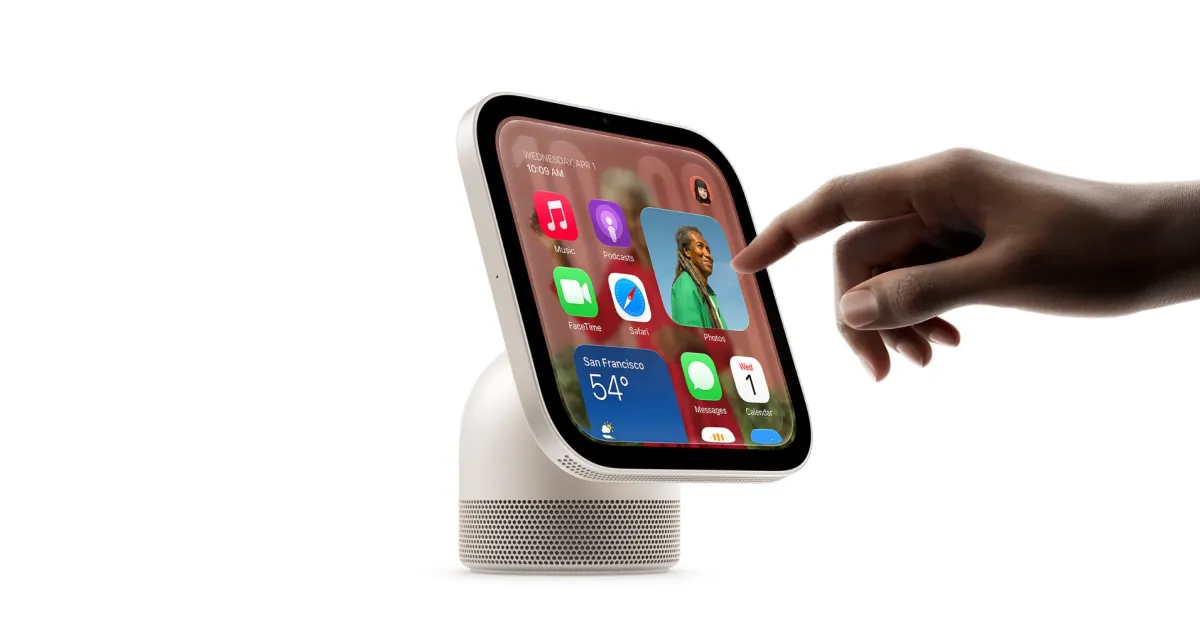
Apple HomeView Launches with Facial Recognition and Guest Controls
Apple released the HomeView smart hub on November 13, 2026, featuring advanced facial recognition and user profile management. The device allows owners to customize guest access, including Safari and Siri permissions. Support documentation details repair costs and troubleshooting for identity verification issues, marking a significant expansion into home automation.
Key points
- Apple released the HomeView smart hub on November 13, 2026, integrating facial recognition and user profile management for personalized home automation.
- The device requires unobstructed, front-facing light for accurate identity verification and will not recognize users wearing sunglasses or face coverings.
- Owners can configure guest controls to restrict Safari access, block adult websites, and limit Siri functionality for unrecognized individuals.
- Apple published comprehensive support guides detailing troubleshooting for identity errors, repair options, and estimated out-of-warranty service costs.
- The HomeView authenticates users via face recognition and linked iOS devices, enabling tailored content delivery and smart home control.
HomeView Official Launch and Support Resources
Apple has officially released the HomeView smart hub, marking a significant entry into the connected home market with a focus on personalized user experiences. Coinciding with the November 13, 2026 launch date, the company has updated its support website with extensive documentation covering setup, troubleshooting, and repair procedures. These resources provide consumers with detailed guidance on managing the device’s advanced features, including facial recognition, user profiles, and smart home integration. The release underscores Apple’s strategy to deepen its ecosystem presence by offering a dedicated hub that combines AI-driven assistance with robust home automation capabilities.
Facial Recognition and User Identification
A central feature of the HomeView is its sophisticated facial recognition system, which allows the device to identify users and deliver personalized content and controls. Apple’s support documentation emphasizes that the device requires front-facing, even lighting to function correctly. Users are advised to ensure the screen is angled toward their face and that they are centered in the frame. The system may fail to recognize individuals if their face is obscured by sunglasses, masks, or other coverings. Additionally, overhanging shelves or cabinets that block the camera’s view can interfere with identification. If the device displays a “Confirm Your Identity” warning, users are instructed to adjust their position or lighting conditions to resolve the issue.
Guest Controls and Privacy Settings
The HomeView offers granular control over guest access, allowing owners to customize what unrecognized users can do. By default, guests can use Siri for general knowledge, writing assistance, and math help, but these features can be disabled. Owners can also restrict access to Safari, block adult websites, and toggle explicit content settings. For music playback, the device can be configured to use a specific Apple Music subscription for unrecognized users. These controls ensure that primary users maintain privacy and security while allowing guests limited functionality. The device also authenticates users through a combination of face recognition and linked iOS devices, adding an extra layer of security to the home network.
Mirror and Display Features
Beyond its smart home functions, the HomeView includes a mirror feature accessible via the Control Center. This function uses the device’s camera to display the user’s reflection, with options for 1x and 2x zoom. An edge light can be activated to improve face illumination in low-light conditions. The device also supports a sleep timer, allowing users to schedule automatic shutdowns. These features position the HomeView not just as a utility hub but as a multifunctional display device for the home. The integration of these tools aims to provide a seamless user experience that blends practicality with aesthetic appeal.
Repair and Service Options
Apple has published detailed guides on preparing the HomeView for service, including Express Replacement Service procedures. The support pages outline steps for sending the device to Apple for repair and provide estimated out-of-warranty costs. Troubleshooting sections address common issues such as missing settings, data loss, and app unavailability. Users are also guided on how to locate the serial number and power adapters for the device. These resources reflect Apple’s commitment to supporting its new hardware with comprehensive customer assistance. The availability of repair information helps consumers understand the long-term maintenance and cost implications of owning the HomeView.
Market Implications and Future Outlook
The launch of the HomeView signals Apple’s continued expansion into the smart home sector, competing with established players by leveraging its ecosystem integration. The emphasis on facial recognition and user profiles differentiates the device from simpler smart speakers and hubs. Analysts note that the detailed support documentation suggests Apple anticipates a high volume of user inquiries, indicating strong initial interest. The device’s ability to authenticate users via iOS devices further ties it to Apple’s broader platform, potentially increasing user retention. As the smart home market evolves, the HomeView’s focus on personalization and security may influence industry standards for privacy and user experience.
Key takeaways
- Apple released the HomeView smart hub on November 13, 2026, featuring facial recognition and user profile management.
- The device requires unobstructed, front-facing light for accurate identity verification and will not recognize users wearing sunglasses.
- Owners can configure guest controls to restrict Safari access, block adult websites, and limit Siri functionality for unrecognized individuals.
- Apple published comprehensive support guides detailing troubleshooting for identity errors, repair options, and estimated out-of-warranty service costs.
- The HomeView authenticates users via face recognition and linked iOS devices, enabling tailored content delivery and smart home control.
Sources
The WireByte editorial team synthesises technology news from multiple primary sources, verifies the facts, and links every source. Articles are produced with AI assistance and reviewed under our editorial policy.