Canva Launches Free All-in-One Affinity App for iPad
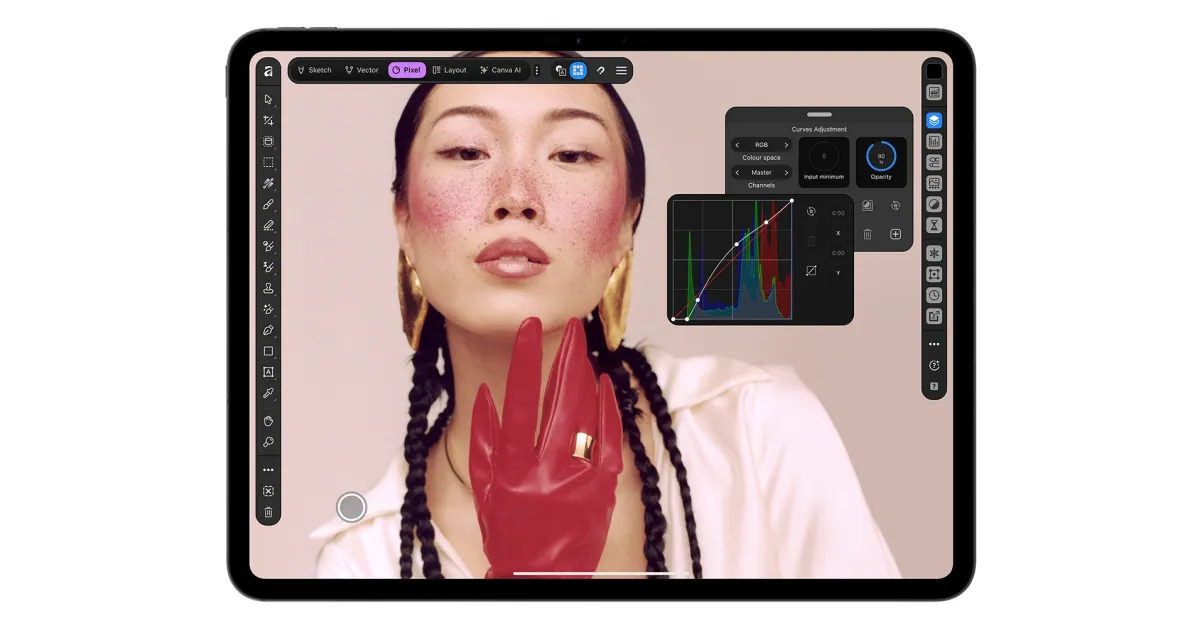
Canva has released Affinity for iPad, an all-in-one creative suite combining sketching, vector design, photo editing, and layout tools. The app, free for individuals with a Canva account, features a touch-optimized interface and Apple Pencil Pro support. It follows a successful desktop relaunch that garnered over seven million sign-ups, aiming to unify professional design workflows on Apple tablets.
Key points
- Canva, the parent company of Affinity, released Affinity for iPad on Monday, November 2, 2026, offering a unified design platform for Apple tablets.
- The application integrates four distinct creative studios—Sketch, Vector, Pixel, and Layout—allowing users to work on a single .af file across disciplines.
- The app is free for individual users who register with a Canva account, mirroring the pricing model of the desktop version launched last year.
- Key features include a new Sketch Studio with hand-drawn-to-vector conversion and full support for Apple Pencil Pro gestures such as barrel roll and squeeze.
- The release follows the desktop version's success, which accumulated more than seven million sign-ups within its first year of operation.
- Canva executives stated the interface was built specifically for touch input rather than scaled from the desktop application to optimize the iPad experience.
Canva Unifies Affinity Suite on iPad
Canva has officially released Affinity for iPad, bringing its comprehensive creative suite to Apple’s tablet platform. The launch marks the culmination of a strategic push to unify the previously separate Affinity Designer, Affinity Photo, and Affinity Publisher applications into a single, cohesive product. This integration, which debuted on desktop platforms last year, is now available on iPad, offering creatives a portable solution for professional-grade design work. The release was announced on Monday, November 2, 2026, positioning the app as a direct competitor to subscription-based creative software by offering its core tools free for individual users.
Touch-First Design and Apple Pencil Integration
Unlike a simple port of the desktop application, Canva emphasized that the iPad version was engineered specifically for touch interfaces and the unique capabilities of the Apple Pencil. The app features a new Sketch Studio designed to streamline the workflow from initial concept to final vector output. This studio includes customizable brush libraries and a feature called Sketch to Shapes, which automatically converts rough hand-drawn forms into clean, editable geometric vectors. The interface allows users to switch seamlessly between the Sketch, Vector, Pixel, and Layout studios while working within a single .af file, eliminating the need for complex file exports or format conversions.
Advanced Tooling and Professional Features
The application provides a robust set of tools tailored for professional workflows. Photo editing capabilities include RAW file support, non-destructive adjustments, and a specialized Mask Tool designed to assist with tracing difficult edges, such as hair and fur, using the Apple Pencil. Layout tools support multi-page documents, master pages, and print-ready output, ensuring that projects can move from digital creation to physical production without loss of quality. The app fully supports Apple Pencil Pro features, including pressure sensitivity, tilt detection, barrel roll, squeeze gestures, and hover functionality, providing creators with granular control over their digital tools.
Market Context and User Adoption
The launch of the iPad version follows the successful relaunch of the Affinity desktop app, which combined the company’s previously distinct products into one suite. Since its desktop debut a year ago, the application has attracted more than seven million sign-ups, indicating strong demand for a unified, non-subscription-based design tool. Duncan Clark, CEO of Pro Design at Canva, highlighted that the primary driver for the iPad release was user demand. He noted that creative work often spans multiple disciplines, and the new app allows users to carry a project from initial sketch to print-ready file entirely on the iPad.
Strategic Implications for Digital Creatives
By offering the app free for individuals, Canva aims to lower the barrier to entry for professional design tools while maintaining a sustainable business model through its broader ecosystem. The requirement for a free Canva account ties the Affinity experience to the company’s wider suite of design services. Neil Ladkin, Affinity’s product design head, stated that every development decision was informed by creators who use iPads professionally. He emphasized that the app was built by people who frequently rotate canvases and adjust tools extensively, ensuring the interface meets the needs of serious designers rather than casual users.
Key takeaways
- Canva released Affinity for iPad on November 2, 2026, unifying design, photo, and layout tools into one app.
- The app is free for individual users with a Canva account, following the desktop version's seven million sign-up milestone.
- A new Sketch Studio allows for hand-drawn sketches to be converted into editable vector shapes automatically.
- Full Apple Pencil Pro support includes barrel roll, squeeze, and hover gestures for precise creative control.
- The interface is built natively for touch, rather than being a scaled-down version of the desktop application.
- Users can work across all creative studios within a single .af file, streamlining the workflow from concept to print.
Sources
The WireByte editorial team synthesises technology news from multiple primary sources, verifies the facts, and links every source. Articles are produced with AI assistance and reviewed under our editorial policy.