Android Auto Tips
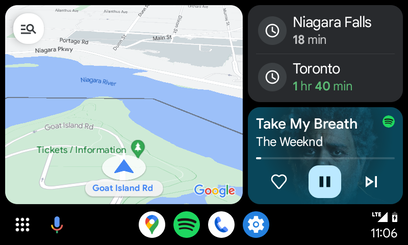
Android Auto offers various settings to enhance user experience, including taskbar widgets and display customization
Key points
- The author recently purchased a 2022 Hyundai Tucson with Android Auto
- Android Auto has a taskbar that can be customized with widgets
- The taskbar widget setting can be accessed through the Android phone's Settings app
- Display settings in Android Auto allow for further customization
- The author finds taskbar widgets to be a helpful feature for frequent app switching
The adoption of Android Auto in newer vehicles has brought significant technological advancements to the driving experience. A recent user's experience with a 2022 Hyundai Tucson highlights the importance of understanding Android Auto's settings. One key setting is the taskbar widget, which can be enabled through the Android phone's Settings app. This feature allows for easier app switching and customization of the in-car display. By exploring Android Auto's settings, users can optimize their experience and make the most of the platform's capabilities.
Sources
The WireByte editorial team synthesises technology news from multiple primary sources, verifies the facts, and links every source. Articles are produced with AI assistance and reviewed under our editorial policy.