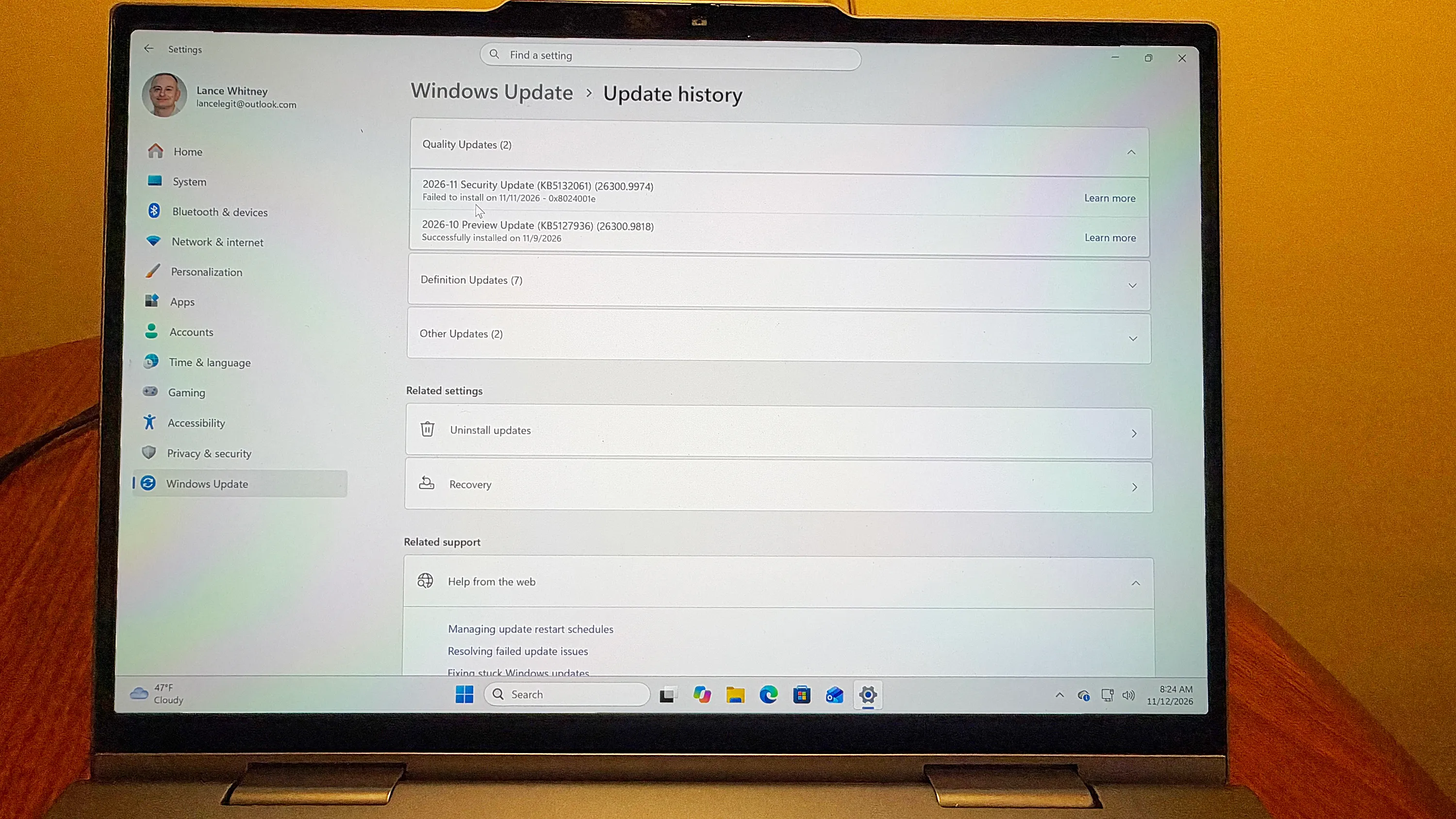
Microsoft November Windows Update Hits Glitches: Print Failures and Installation Errors
Microsoft’s November 2026 Windows security update (KB5132061) is causing installation failures for users who previously installed the October 28 preview patch, often returning error codes like 0x80070306. Additionally, the update breaks printing for documents with zero-dimension images and disrupts Windows activation via SLMGR. Microsoft has deployed a fix, promising resolution within 48 hours of November 11.
Key points
- Microsoft released security update KB5132061 on November 10, 2026, which is affecting multiple versions of Windows 10 and Windows 11, including Windows Server.
- Users who installed the October 28 preview update may encounter installation failures with error codes such as 0x80070306, 0x800f0989, or 0x800f0993.
- The update causes printing failures in Microsoft Word and other applications when documents contain images with zero height or width at the selected resolution.
- Administrators managing Windows activation may experience failures when using the Software Licensing Management Tool (SLMGR) due to the new patch.
- Microsoft confirmed the issues and stated that a fix is being rolled out, with affected systems expected to be repaired within 24 to 48 hours starting November 11 at 1pm ET.
Installation Failures and Error Codes
Microsoft has issued a warning regarding its November 2026 Patch Tuesday security update, designated KB5132061, which is failing to install on certain Windows devices. The issue primarily impacts users who have already installed the preview update released on October 28. When these users attempt to install the final November update released on November 10, the process often stalls or fails completely. Affected systems may repeatedly attempt the installation without success, or users may receive specific error codes, including 0x80070306, 0x800f0989, or 0x800f0993. Microsoft acknowledged the problem on its support page, confirming that the preview patch creates a conflict with the subsequent security update.
Printing Disruptions in Word and Other Apps
Beyond installation issues, the update introduces a significant functional defect related to document printing. Microsoft reported that documents containing images with a height or width of zero at the selected printing resolution may fail to print. These zero-dimension images are often invisible to the user but can be part of a document’s watermarking or layout structure. The issue was specifically observed when printing Microsoft Word documents using the Windows Graphics Device Interface (GDI), though Microsoft noted that printing from other applications might also be affected. This means that even if a user does not manually insert such an image, document-generation tools may have added them, resulting in a blank or failed print job after the update.
Activation and Licensing Complications
The update also impacts enterprise and administrative functions related to Windows licensing. Microsoft warned that certain Windows activation and licensing operations performed using the Software Licensing Management Tool (SLMGR) might fail after the installation of the November 2026 security update. This issue is described as niche but potentially problematic for organizations that rely on command-line tools or automated processes to manage Windows activation across their networks. Administrators utilizing SLMGR for bulk activation or status checks may find these operations broken until a resolution is provided.
Affected Systems and Scope
The glitches affect a broad range of Microsoft operating systems. The printing issue reportedly impacts most versions of Windows, ranging from the latest Windows 11 26H2 build down to Windows 10 Enterprise LTSC 2016. Windows Server versions from 2025 back to 2016 are also subject to the printing defect. The installation failure, while linked to the preview update, affects the broader ecosystem of Windows 11 users attempting the November security patch. Microsoft has not specified a precise percentage of affected users, but the widespread nature of the preview installation suggests a significant number of devices are impacted.
Microsoft’s Response and Timeline
Microsoft has confirmed that it is actively working on a fix for the installation failure. The company stated that all affected PCs should receive repairs within 24 to 48 hours starting from November 11 at 1pm ET. Users are advised to be patient and allow the automatic update process to complete once the fix is deployed. For the printing and SLMGR issues, Microsoft has issued notifications (WI1549472) to inform users and administrators of the potential disruptions. The company has not yet provided a specific timeline for the resolution of the printing and licensing defects, though the installation fix is prioritized.
Key takeaways
- Microsoft’s November 2026 update KB5132061 causes installation failures for users with the October 28 preview patch.
- Error codes 0x80070306, 0x800f0989, and 0x800f0993 are common indicators of the installation conflict.
- Documents with zero-dimension images may fail to print, affecting Word and other GDI-based applications.
- Windows activation via SLMGR may fail, impacting enterprise administrators and automated licensing processes.
- Microsoft is rolling out a fix for installation issues, promising resolution within 48 hours of November 11.
- The defects affect Windows 10, Windows 11, and Windows Server versions spanning several years.
Sources
The WireByte editorial team synthesises technology news from multiple primary sources, verifies the facts, and links every source. Articles are produced with AI assistance and reviewed under our editorial policy.